How to Create a Visual Schedule: Complete Guide for Special Needs
Visual schedules are one of the most effective evidence-based tools for supporting children and adults with autism, ADHD, Down syndrome, developmental delays, and other learning differences. They also work wonderfully for neurotypical children who thrive with structure and routine. Whether you’re a parent, caregiver, teacher, or therapist, this comprehensive guide will teach you everything you need to know about creating and using visual schedules effectively.
What Is a Visual Schedule?
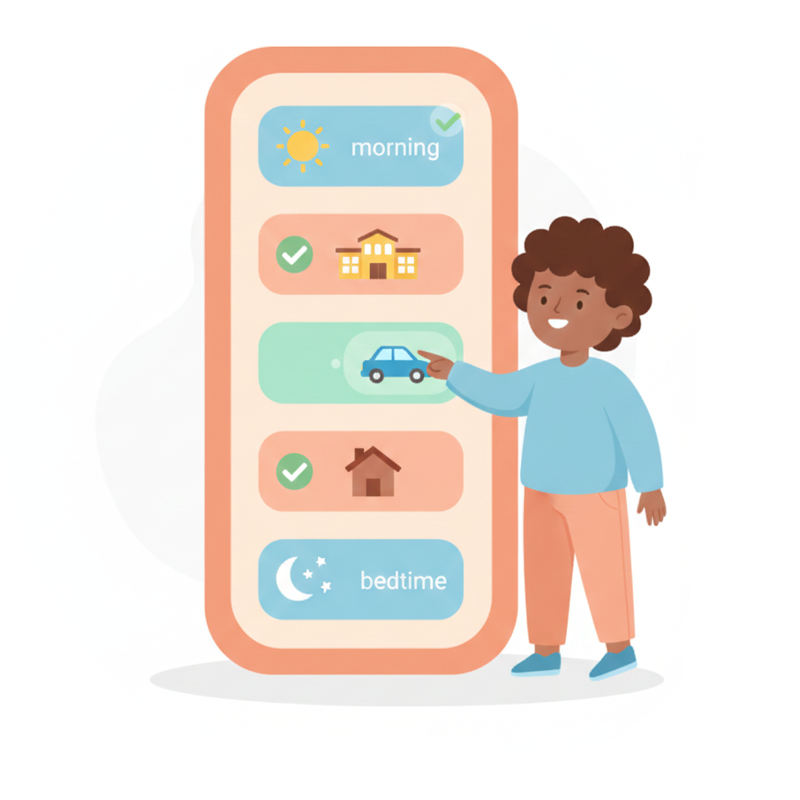
A visual schedule is a series of pictures, symbols, or words that shows activities in a specific order. It answers two fundamental questions: “What’s happening now?” and “What comes next?”
Visual schedules can take many forms:
- A simple two-picture display showing “first breakfast, then school”
- A morning routine with 6-8 steps displayed vertically
- A full day plan showing all activities from wake-up to bedtime
- A First/Then board motivating task completion with rewards
The key is that information is presented visually rather than relying solely on spoken words—making it accessible to a wide range of learners.

Who Benefits from Visual Schedules?
Visual schedules help far more people than many realize:
Autism Spectrum Disorder (ASD)
The UNC TEACCH Autism Program uses structured teaching and visual supports to provide meaning and promote independence. Visual schedules also give information a stable form that can be checked again, rather than relying only on spoken instructions that disappear immediately.
ADHD
Children and adults with ADHD often struggle with executive function, time management, and task initiation. Visual schedules externalize the planning process, making it easier to stay on track without constant reminders.
Down Syndrome
Visual schedules support independence and routine-building. The combination of pictures and repetition helps with memory and sequencing skills.
Developmental Delays
For children who are developing at their own pace, visual schedules provide concrete, understandable structure that meets them where they are.
Anxiety
When you know what’s coming next, worry decreases. Visual schedules provide predictability that helps anxious children (and adults) feel more in control of their day.
Sensory Processing Disorder
Transitions can be overwhelming when sensory processing is challenging. Visual schedules prepare the nervous system for what’s coming next.
Intellectual Disabilities
Visual learning often remains strong even when other learning channels are affected. Pictures communicate clearly across cognitive levels.
Neurotypical Children
Many typically developing children simply do better with structure! Visual schedules reduce nagging, build independence, and make routines smoother for the whole family.
Bottom line: If someone in your life benefits from knowing what to expect, a visual schedule can help.
Why Visual Schedules Work
The effectiveness of visual schedules isn’t just anecdotal—it’s backed by decades of research. Here’s why they work:
1. Visual Information Persists
Spoken instructions disappear the moment they’re said. Visual schedules remain constant and can be referenced again and again. This is especially important for anyone who processes auditory information slowly or has working memory challenges.
2. Predictability Reduces Anxiety
Uncertainty about what comes next causes stress for many people. Visual schedules provide concrete predictability by showing exactly what will happen and in what order. When the day feels predictable, anxiety decreases and cooperation increases.
3. Supports Executive Function
Executive function skills—planning, organizing, remembering instructions, and transitioning between activities—are challenging for many people with ADHD, autism, and other conditions. Visual schedules externalize these cognitive demands onto paper or a screen, making them more manageable.
4. Reduces Verbal Prompting
Instead of needing constant reminders (“Time to brush your teeth! Did you brush your teeth? Go brush your teeth!”), individuals can check their schedule independently. This builds autonomy, preserves dignity, and reduces friction between caregivers and children.
5. Decreases Challenging Behaviors
Many challenging behaviors stem from anxiety, confusion, or communication difficulties. When individuals understand what’s expected and what’s coming next, frustration decreases. Visual schedules give people a tool to understand their world.
6. Builds Independence
Over time, individuals learn to check and follow their schedules without prompting. This independence carries over into other areas of life.
Types of Visual Schedules
Different individuals respond to different types of visual supports. Here are the main categories:
Object Schedules
Real objects represent activities. A toothbrush means “brush teeth,” a plate means “mealtime.”
Best for: Very young children, individuals who don’t yet understand pictures, those with significant visual impairments.
Photo Schedules
Actual photographs of items, places, people, or activities specific to the individual’s life.
Best for: Young children, those who need concrete representations, beginners to visual schedules.
Picture Symbol Schedules
Standardized icons or line drawings representing activities. Examples include Mulberry Symbols, PCS (Picture Communication Symbols), and SymbolStix.
Best for: Classroom settings, those familiar with symbol systems, individuals who use AAC devices.
Written Schedules
Words, checklists, or bullet points describing activities.
Best for: Readers, teens and adults, those who prefer text over images.
Combination Schedules
Pictures paired with words for maximum clarity and literacy support.
Best for: Most users—this approach supports comprehension while building reading skills.
Apps like MyVisualRoutine offer combination schedules with 50+ preloaded activities that include both images and text.
Visual Schedule Examples by Routine
Morning Routine Visual Schedule
A typical morning routine might include:
- Wake up
- Use toilet
- Wash hands and face
- Get dressed
- Eat breakfast
- Brush teeth
- Put on shoes
- Get backpack
- Go to car/bus
Pro tip: Start with 5-7 steps. You can always break activities down further or add steps once the basic routine is established.
Bedtime Routine Visual Schedule
- Take bath/shower
- Put on pajamas
- Brush teeth
- Use toilet
- Read story
- Hugs and kisses
- Lights out
After-School Routine
- Hang up backpack
- Wash hands
- Have snack
- Homework time
- Free play
- Help with dinner
- Family time
ADHD-Specific: Homework Routine
Breaking homework into smaller visual steps helps children with ADHD:
- Get homework folder
- Set timer (15 minutes)
- Work until timer
- Take 5-minute break
- Set timer again
- Work until done
- Put homework in backpack
- Celebrate!

How to Create Your First Visual Schedule
Follow these six steps to create an effective visual schedule:
Step 1: Identify One Challenging Routine
Don’t try to schedule the entire day at once. Pick one routine that’s currently difficult. Common starting points include:
- Morning routine (often rushed and stressful)
- Bedtime routine (transitions to sleep can be hard)
- Getting ready for school
- Homework time (especially helpful for ADHD)
- After-school transitions
Step 2: Break the Routine Into Steps
Write down every step in the routine. Be specific. “Get ready for bed” is too vague—break it into brush teeth, put on pajamas, use toilet, etc.
Watch your child go through the routine and note what actually happens. You might be surprised by steps you’ve forgotten or the order things naturally occur.
Step 3: Choose Your Format
Consider:
- Age and developmental level: Photos work well for younger children; symbols or text for older individuals
- Portability needs: Will this be used in one location (wall-mounted) or multiple places (app on phone/tablet)?
- Individual preferences: Some people prefer real photos of their own items; others like consistent symbol styles
- Attention span: For ADHD, shorter schedules with built-in breaks often work better
Step 4: Create or Gather the Visuals
You have several options:
- Take photos with your phone of actual items in your home
- Use symbol libraries like Mulberry Symbols (free) or purchase PCS
- Use an app like MyVisualRoutine with professionally designed, preloaded activities
Using an app is often the fastest way to get started because you don’t need to print, laminate, or organize physical materials.
Step 5: Arrange and Display
- Present activities from top to bottom or left to right (following reading direction)
- Position the schedule at eye level and in the location where the routine happens
- Consider adding a “finished” area or “all done” indicator for completed activities
- Make sure it’s easily accessible—the individual should be able to check it independently
Step 6: Actively Teach How to Use It
Simply posting a schedule isn’t enough. You need to teach how to use it:
- Point to the first item: “Look, first we brush teeth”
- Complete the activity together
- Return to the schedule and mark the activity as done
- Point to the next item: “Next is get dressed”
- Repeat until the routine is complete
- Celebrate: “You finished your whole morning routine!”
With consistent practice, individuals learn to check the schedule independently.
Tips by Condition
For Autism
- Keep the visual environment calm—avoid cluttered schedules
- Consider sensory preferences when choosing images
- Use the same schedule consistently; change can cause stress
- Pair with social stories for new routines
For ADHD
- Include movement breaks within longer routines
- Use timers alongside the visual schedule
- Keep individual tasks short (10-15 minutes max)
- Make completion satisfying—checkboxes, moving pieces, celebration sounds
- Consider color-coding by activity type
For Down Syndrome
- Use real photographs when possible
- Keep steps simple and concrete
- Celebrate each completed step
- Be patient—repetition builds mastery
For Anxiety
- Show the whole day so there are no surprises
- Include “something fun” on every schedule
- Use a “change” card to prepare for unexpected events
- Review the schedule together before the day/routine begins
Common Mistakes to Avoid
Starting with Too Many Steps
A 20-step schedule is overwhelming. Begin with 5-7 steps for a single routine. Success builds confidence.
Inconsistent Use
Visual schedules work through repetition and predictability. Using the schedule only sometimes undermines its effectiveness. Commit to using it every single time for at least 2-3 weeks.
Using Outdated or Inaccurate Pictures
If your bathroom has been remodeled but the photo shows the old bathroom, this creates confusion. Keep visuals current and accurate.
Removing the Schedule Too Soon
Caregivers sometimes think, “They’ve learned the routine now, so we don’t need the schedule anymore.” However, visual supports often remain helpful long-term, especially during stressful periods, illnesses, or schedule changes. There’s no harm in keeping the support in place.
Using the Schedule as Punishment
Never manipulate the schedule as punishment (“If you don’t behave, we’re taking the park off the schedule”). This destroys trust. The schedule should be a reliable representation of what will actually happen.
Making It Too Rigid
Schedules should reduce anxiety, not create rigidity. Include “change” or “surprise” cards for unexpected events. Teach flexibility within the structure.
Digital vs. Physical Visual Schedules
Both approaches have merit. Many families use a combination.
Physical Schedules (Velcro boards, picture binders, wall charts)
Advantages:
- Tactile interaction (moving pieces can be satisfying)
- No screen time concerns
- Always visible without needing to open an app
- Works without batteries or WiFi
Disadvantages:
- Not easily portable
- Pictures can get lost, damaged, or disorganized
- Harder to update or customize
- Requires printing, laminating, and organizing
Digital Schedules (Apps like MyVisualRoutine)
Advantages:
- Always with you on your phone or tablet
- Easy to update, rearrange, and customize
- Built-in features like visual timers, audio recordings, and progress tracking
- Choice boards and First/Then boards in the same app
- No materials to lose or replace
Disadvantages:
- Requires a device
- Potential for distraction from other apps (use Guided Access mode)
- Screen time considerations
Our recommendation: Start with whatever format you’ll actually use consistently. Many families use physical schedules at home (posted in the bathroom, kitchen, bedroom) and a digital app for on-the-go situations, travel, and therapy appointments.

Using Visual Schedules Alongside Other Tools
Visual schedules work even better when combined with complementary tools:
Choice Boards
Choice boards present 2-4 options and let individuals make decisions. Use them within schedules: “Snack time—which snack do you choose?” Giving choices increases cooperation and builds decision-making skills.

First/Then Boards
First/Then boards use the power of motivation. “First homework, THEN video games.” This technique (based on Applied Behavior Analysis principles) helps with challenging or non-preferred activities.

Day Plans
While routines focus on step-by-step task completion, day plans show the bigger picture—what’s happening throughout the entire day. This helps with transitions and reduces “what’s next?” anxiety.
Visual Timers
Visual timers show the passage of time concretely. They help with transitions (“5 more minutes of play, then cleanup”) and task duration (“Brush teeth until the timer is done”). Especially helpful for ADHD.
Tips for Long-Term Success
-
Involve the individual: When possible, let them help choose pictures, arrange the schedule, or pick which routine to work on first. Buy-in increases success.
-
Prepare for changes: Life isn’t perfectly predictable. Teach flexibility by occasionally using a “change” or “surprise” card. Practice handling small changes before big ones.
-
Celebrate completion: Positive reinforcement matters. Acknowledge when the schedule is finished—a high five, verbal praise, or a small reward.
-
Review and revise regularly: Skills develop over time. What worked at age 4 may need updating at age 6. Review schedules every few months.
-
Share across environments: Visual schedules work best with consistency. Share your approach with teachers, therapists, grandparents, and other caregivers. Many families take screenshots or print copies for school.
-
Be patient: Some individuals take to visual schedules immediately; others need weeks of consistent practice. Don’t give up too soon.
Frequently Asked Questions
What age should I start using visual schedules?
Visual schedules can be introduced as early as toddlerhood. Even very young children benefit from seeing “first this, then that.” There’s no upper age limit—visual supports help teens and adults too.
How long does it take to see results?
Most families notice improvements within 1-2 weeks of consistent use. Some changes (like reduced transition meltdowns) can happen almost immediately. Executive function and independence skills develop over longer periods.
My child can read. Do they still need pictures?
Many reading individuals still benefit from visual schedules. Pictures process faster than text, especially during stressful moments or when executive function is depleted. Consider offering both—pictures with words—and let the individual’s preference guide you.
Should I use visual schedules at school too?
Absolutely. Consistency across environments reinforces learning and reduces confusion. Share your approach with teachers and therapists. Most special education classrooms already use visual supports, so coordination is usually straightforward.
Do visual schedules work for ADHD?
Yes! Visual schedules are highly effective for ADHD because they externalize executive function demands. The key is keeping tasks short, building in breaks, and making completion satisfying. Pair with timers for best results.
What if my child tears up the schedule or refuses to use it?
This sometimes happens. Possible solutions:
- Start with only preferred activities on the schedule (build positive association)
- Use a digital app that can’t be torn
- Examine whether the schedule is predicting too many demands
- Give choices about which pictures to use
- Consult with a behavior specialist if resistance persists
Can visual schedules help with transitions?
Yes—this is one of their greatest strengths. Visual schedules make transitions predictable. The individual can see what’s ending, what’s coming next, and can mentally prepare. Pair with countdown warnings (“Two more minutes, then we check the schedule”) for best results.
Are visual schedules just for kids?
Not at all. Many teens and adults with autism, ADHD, intellectual disabilities, and even anxiety disorders use visual schedules. The format might be different (a phone app rather than pictures on a wall), but the principle is the same.
Ready to Get Started?
Creating visual schedules doesn’t have to be complicated. With MyVisualRoutine, you can create professional visual schedules in minutes:
- 50+ preloaded activities across hygiene, meals, school, play, and more—no setup required
- Custom photos and voice recordings (Premium) for personalized routines
- Built-in visual timers to support time awareness
- Choice boards and First/Then boards in the same app
- Day plans to show the whole day at a glance
- Works completely offline—no internet needed
- Privacy-first design—your data stays on your device, never uploaded to servers
Whether you’re supporting a child with autism, ADHD, Down syndrome, developmental delays, anxiety, or simply a kid who does better with routine—visual schedules can transform your daily life.
Download MyVisualRoutine free and build your first schedule today. Free to start, with an optional Premium upgrade.
Related Resources:
- Bedtime Visual Schedule for Autism
- Visual Schedule Feature Guide
- Choice Boards for Communication
- First/Then Boards Guide
- Free Visual Schedule Resources
This article was written by a parent and app developer, not a clinical professional. It is for informational purposes only and does not constitute medical, therapeutic, or educational advice. The strategies described here are based on published research and widely used frameworks, but every individual is different. Please consult a qualified professional — such as a BCBA, occupational therapist, speech-language pathologist, or special education teacher — before making changes to your child’s support plan.

Try MyVisualRoutine Free
Create visual schedules, choice boards, and First/Then boards in minutes. 50+ preloaded activities included. Free to start. Optional Premium upgrade.