Choice Boards for Autism: A Parent's Complete Guide
Your child points at the fridge and screams. You open it and start guessing: “Milk? Juice? Yogurt?” Each wrong guess brings more frustration—for both of you.
Now imagine placing three pictures on the counter: milk, juice, yogurt. Your child points to juice. Done. No guessing, no meltdown, no tears.
That’s the power of a choice board. It’s one of the simplest and most effective visual support tools available, and it can transform daily communication for children with autism, language delays, or other communication differences.
In this guide, you’ll learn exactly what choice boards are, why research supports them, how to create and use them effectively, and the mistakes that trip up most families.
What Is a Choice Board?
A choice board is a visual display that presents two to four options, allowing a person to communicate their preference by pointing, touching, or selecting an image. Each option is represented by a picture, photograph, symbol, or word—depending on the individual’s communication level.
Choice boards are rooted in AAC (Augmentative and Alternative Communication) principles. AAC encompasses all the tools and strategies that supplement or replace spoken language, from simple picture cards to high-tech speech-generating devices. Choice boards sit at the simpler end of this spectrum, making them an ideal starting point for families new to visual communication supports.
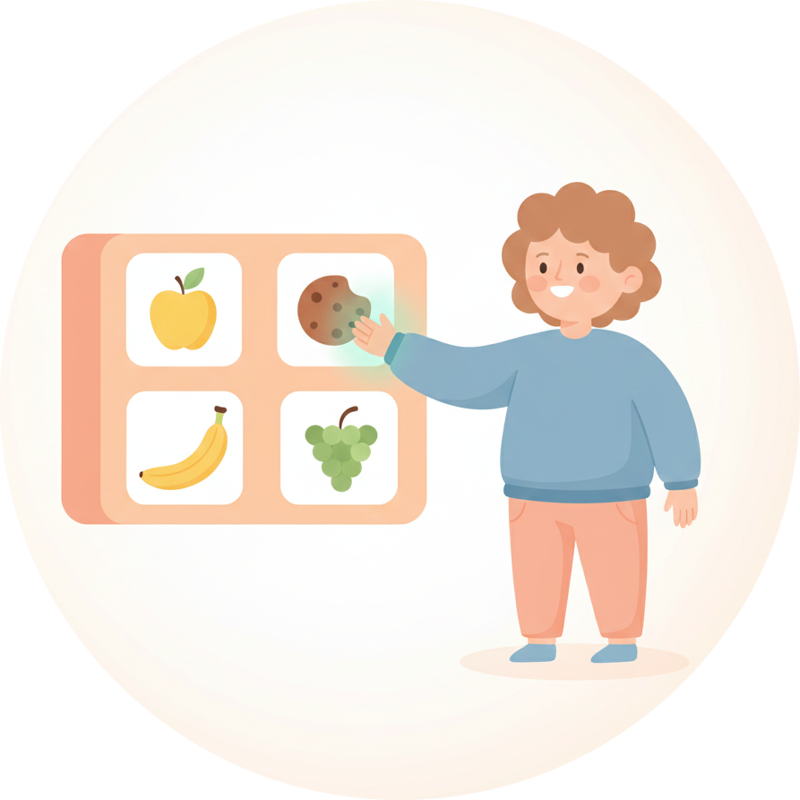
Unlike a visual schedule (which shows the sequence of a routine) or a First/Then board (which motivates task completion), a choice board focuses on one thing: enabling someone to express what they want.
Why Choice Boards Work: The Research
Choice boards aren’t just a convenient parenting tool—they’re backed by decades of behavioral and communication research.
The Evidence Base
According to the National Clearinghouse on Autism Evidence and Practice (Steinbrenner et al., 2020) at the University of North Carolina at Chapel Hill, choice-making interventions are classified as an evidence-based practice for individuals with autism. The U.S. Surgeon General and the American Psychological Association recognize ABA-based strategies—including choice-making—as effective approaches supported by over 40 years of research.
Studies consistently show that providing choices leads to:
- Higher on-task behavior in children with autism spectrum disorders
- Increased engagement through a sense of control and ownership
- Decreased protests and resistance during activities
- Reduced challenging behaviors stemming from communication frustration
The American Speech-Language-Hearing Association’s AAC practice guidance describes picture communication boards, visual schedules, and communication apps as forms of AAC. Its evidence summary links to research on AAC and language development; AAC is intended to supplement or compensate for communication, not to withhold speech.
Why Visuals Beat Verbal-Only Choices
The Indiana Resource Center for Autism (IRCA) at Indiana University explains that verbal presentation of choices is often ineffective for individuals with autism. A child may not tune into the message until the second or third option is already being spoken. The message may be quickly forgotten. With a visual display, the individual has time to see all possibilities, think about the decision, and check options as often as needed before making a choice.
This is why simply asking “Do you want milk, juice, or yogurt?” often fails—but showing three pictures works.
Who Benefits from Choice Boards?
Children with Autism
Choice boards are particularly valuable for autistic children because:
- Visual processing is often a strength. Many autistic individuals process visual information more effectively than auditory input
- Reduced communication pressure. Pointing to a picture requires less effort than formulating words
- Predictable structure. The consistent format reduces anxiety around decision-making
- Independence. Children can initiate communication without relying on an adult to interpret their behavior
Research estimates that approximately 30–40% of children diagnosed with autism present with little to no functional speech. For these children, choice boards can be one of the first steps toward independent communication.
Children with Language Delays
Even children who are developing speech can benefit from choice boards during the language-building years. The visual-verbal pairing (seeing the picture while hearing the word) reinforces vocabulary development and supports emerging language skills.
Children with ADHD
Children with ADHD often struggle with:
- Processing multi-step verbal instructions
- Making decisions when feeling overwhelmed
- Remembering options that were presented verbally
Choice boards address all of these by making options visible, concrete, and persistent.
Across Ages and Settings
Choice boards aren’t limited to young children. They’re used successfully with:
- Toddlers learning to express preferences
- School-age children in classroom settings
- Teenagers making social and academic choices
- Adults with intellectual disabilities in residential and vocational programs
Types of Choice Boards
By Number of Options
| Type | Best For | Example |
|---|---|---|
| 2-choice board | Beginners, overwhelmed choosers | ”Crackers or apple?“ |
| 3-choice board | Most everyday situations | ”Park, playground, or bikes?“ |
| 4-choice board | Confident choosers | Meal choices with four options |
Research-backed tip: Start with 2 options and increase only when the child demonstrates consistent, intentional choosing. Too many options can overwhelm rather than empower.
By Visual Type
- Photographs: Real photos of actual items (most concrete—best for beginners)
- Icons/Symbols: Standardized picture symbols like those used in AAC systems
- Line drawings: Simple black-and-white illustrations
- Words: Text-only boards (for readers)
Best practice: Use the most concrete representation the child can understand. Real photographs of the actual items in your home are usually most effective for young children and those new to choice boards.
By Context
- Meal choice boards: What to eat for breakfast, lunch, snack
- Activity choice boards: What to do during free time
- Clothing choice boards: What to wear today
- Reward choice boards: What to earn after a task (pairs well with First/Then boards)
- Emotion choice boards: How the child is feeling
- Social choice boards: Who to play with, what game to play
How to Create and Use a Choice Board: Step by Step
Step 1: Start with High-Motivation Situations
Don’t introduce choice boards during difficult moments. Begin with situations where your child is already motivated—like choosing a snack, picking a toy, or selecting a show to watch.
Why this matters: You want the child to learn that the board is a reliable communication tool. Starting with preferred items ensures early success and builds trust in the system.
Step 2: Select the Right Number of Options
- New to choice boards: Start with 2 options
- Showing consistent choosing: Move to 3 options
- Confident and independent: Try 4 options
If your child seems overwhelmed, randomly selects without looking, or always picks the same position (e.g., always the one on the left), you may have too many options. Go back to 2.
Step 3: Use Clear, Meaningful Visuals
Each option should be:
- Recognizable: The child can identify what the picture represents
- Distinct: Options look clearly different from each other
- Accurate: The picture matches what the child will actually receive
- Appropriately sized: Large enough to see and touch easily
Step 4: Present the Board
- Show the board to your child at eye level
- Point to each option while naming it: “Crackers… or apple?”
- Wait. Give the child time to process and respond (at least 5–10 seconds)
- Accept any clear indication of choice—pointing, touching, looking, reaching
- Immediately honor the choice. Hand them the item they selected
Step 5: Pair with Language
As the child selects, model the word: “Apple! You chose apple. Here’s your apple.” This visual-verbal pairing supports language development without requiring the child to speak.
Step 6: Expand Gradually
Once the child reliably uses choice boards in one context:
- Add more options (2 → 3 → 4)
- Use in new situations (meals → activities → clothing)
- Introduce new visual types (photos → icons)
- Encourage more independence (less prompting)
Choice Board Examples by Category
Snack Time
| Option 1 | Option 2 | Option 3 |
|---|---|---|
| Crackers | Apple slices | Yogurt |
| Goldfish | Banana | Cheese stick |
| Pretzels | Grapes | Granola bar |
Free Time Activities
| Option 1 | Option 2 | Option 3 |
|---|---|---|
| Blocks | Coloring | Play-Doh |
| Swing set | Sandbox | Bike ride |
| Puzzles | Books | Trains |
Morning Routine Choices
| Decision | Option A | Option B |
|---|---|---|
| Breakfast | Cereal | Toast |
| Shirt | Blue shirt | Red shirt |
| Shoes | Sneakers | Sandals |
Emotion Check-In
| Happy | Sad | Angry | Tired |
|---|
Emotion choice boards help children identify and communicate how they’re feeling—a critical skill that many autistic children find challenging without visual support.
Reward Choices (with First/Then Boards)
After completing a non-preferred task using a First/Then board, let the child use a choice board to pick their reward:
| iPad | Park | Snack | Bubbles |
|---|
This combination gives children both motivation (First/Then) and autonomy (choice board).
Physical vs. Digital Choice Boards
Physical (Paper, Velcro, Laminated)
Pros:
- No technology needed
- Tangible and concrete
- Easy to make with printed photos
Cons:
- Pictures get lost, bent, or damaged
- Hard to update quickly
- Not portable for on-the-go situations
- Require preparation and printing
Digital (App-Based)
Pros:
- Always on your phone—ready when you need it
- Easy to update with new options in seconds
- Custom photos make it personal
- Audio feedback reinforces selections
- Track preferences over time
Cons:
- Requires a device
- Screen use considerations
MyVisualRoutine offers digital choice boards with:
- 2–4 options per board with large, accessible touch targets
- Full-screen presentation to minimize distractions
- Audio feedback and text-to-speech when a selection is made
- Custom photos so you can use pictures of your child’s actual items
- Selection history to track preferences and patterns over time
- Offline functionality—works without internet
- Privacy-first design—all data stays on your device
Many families use both: a digital board on their phone for on-the-go situations, and a physical board at home on the fridge or in the kitchen.
Tips for Success
1. Only Offer Available Options
Never put an option on the board that you can’t or won’t provide. If you show “playground” but it’s raining and you can’t go, you’ve just taught the child that the board doesn’t work.
Rule: If it’s on the board, it’s available. Period.
2. Honor Every Choice
Even if your child picks something you’d prefer they didn’t, follow through. The goal is to teach that communication works. If you override their choice, you’re teaching them that their communication doesn’t matter.
3. Accept All Forms of Indicating
A “choice” doesn’t have to be a perfect point. Accept:
- Reaching toward the image
- Eye gaze (looking at the preferred option)
- Touching or tapping
- Picking up a picture card
- Vocalizing while looking at an option
4. Wait Before Prompting
After presenting the board, wait at least 5–10 seconds before offering help. Many children need processing time. Jumping in too quickly teaches them to wait for your prompt rather than initiating independently.
5. Keep It Positive
Choice boards should feel empowering, not demanding. If the child doesn’t want to choose, that’s information too. Don’t force it. Try again later with higher-motivation options.
6. Be Consistent Across Settings
Share your choice board approach with everyone who interacts with your child:
- Other parent/caregiver
- Grandparents
- Teachers and aides
- Therapists
- Babysitters
Consistency across environments helps the child generalize the skill.
Common Mistakes to Avoid
Mistake 1: Too Many Options Too Soon
Offering 4 options to a child who has never used a choice board sets them up for overwhelm.
Solution: Start with 2 clear, high-contrast options. Only add more when you see consistent, intentional choosing.
Mistake 2: Using Unclear Images
A generic clip-art apple looks nothing like the specific yogurt pouch your child loves.
Solution: Use real photographs of the actual items whenever possible. Take photos of your child’s specific snacks, toys, and activities.
Mistake 3: Not Honoring the Choice
“You picked cookies but let’s have fruit instead” teaches the child that choosing is pointless.
Solution: Only put options on the board that you’re willing to provide. If cookies aren’t an option right now, don’t include them.
Mistake 4: Treating It as a Test
Asking “What’s this? Can you tell me what this is?” while pointing to each option turns communication into a quiz.
Solution: Keep it simple. Present, name the options, wait for a choice, deliver. That’s it.
Mistake 5: Giving Up Too Quickly
Some children need days or weeks of consistent exposure before they fully understand and trust the system.
Solution: Use the board consistently for at least 2–3 weeks before deciding it’s not working. If you’re still not seeing engagement, consult with a speech-language pathologist or BCBA.
Mistake 6: Only Using It for Non-Preferred Items
If choice boards only appear when you want the child to pick between two vegetables, the board becomes associated with demands.
Solution: Use choice boards primarily for preferred items, especially in the beginning. Fun choices build positive associations.
Choice Boards vs. Other Visual Supports
| Tool | Purpose | When to Use |
|---|---|---|
| Choice Board | Express a preference | ”What do you want?” |
| Visual Schedule | Show a sequence of activities | ”Here’s what’s happening today” |
| First/Then Board | Motivate task completion | ”Do this, then get that” |
| Day Plan | Overview of the whole day | ”Here’s your day” |
| PECS System | Request items via picture exchange | Full communication system |
These tools complement each other. Many families use all of them:
- Day plan for the daily overview
- Visual schedule for step-by-step routines
- Choice board when it’s time to pick something
- First/Then board when motivation is needed
Frequently Asked Questions
What age can I start using choice boards?
Choice boards can be introduced as early as 12–18 months for typically developing children, or at any age for children with communication differences. There is no upper age limit. Adults with intellectual disabilities and communication needs also benefit from choice boards in residential and vocational settings.
Will using choice boards prevent my child from learning to talk?
No. AAC can supplement existing speech or provide another communication route when speech is absent or unreliable. The goal is access to communication, and the right system should be individualized with support from a qualified speech-language professional when needed. See ASHA’s AAC overview.
How many options should I offer?
Start with 2 options and increase gradually. Research suggests 2–4 options is optimal for most individuals. More than 4 can cause overwhelm and lead to random or position-based selecting rather than genuine choosing.
What if my child always picks the same thing?
This is actually useful information—it tells you that item is highly preferred. To check if they’re genuinely choosing (vs. always picking the left side), try:
- Switching the position of items
- Offering two equally preferred items
- Offering one preferred and one non-preferred item to see if they discriminate
Can choice boards be used at school?
Absolutely. Choice boards are widely used in special education classrooms, during therapy sessions, and in inclusive settings. Share your home approach with your child’s educational team so they can use the same system. Consistency between home and school dramatically improves outcomes.
What’s the difference between a choice board and PECS?
PECS (Picture Exchange Communication System) is a structured, six-phase communication training program where the child physically exchanges a picture card with a communication partner to make a request. Choice boards are simpler—the child points to or touches an option on a display. PECS is a comprehensive system; choice boards are a single communication tool that can be used informally.
My child isn’t interested in the choice board. What should I do?
Try these adjustments:
- Make sure the options are genuinely motivating (use their very favorite items)
- Use real photographs instead of symbols or drawings
- Reduce to just 2 options
- Model the behavior (you point to the board to make your own choices)
- Use the board in natural moments rather than structured “practice sessions”
- Consult a speech-language pathologist if challenges persist
Getting Started with Choice Boards
Ready to try choice boards with your child? Here’s how to begin today:
The 5-Minute Start
- Pick a high-motivation moment (snack time is usually best)
- Choose 2 options your child enjoys
- Show the options side by side (photos on paper, actual items, or a phone screen)
- Name each option clearly
- Wait for your child to indicate a preference
- Deliver immediately and celebrate: “Juice! You picked juice!”
Use an App
MyVisualRoutine makes creating choice boards fast and flexible:
- 50+ preloaded activities so you can get started without creating anything
- Create custom boards in seconds with your own photos
- Full-screen, distraction-free display designed for independent use
- Audio feedback confirms the selection with sound and text-to-speech
- Track choices over time to discover preference patterns
- Works offline—no internet needed, ever
- Privacy-first—your child’s data never leaves your device
Whether you start with paper or digital, the important thing is to start. Every choice your child makes successfully is a step toward more independent communication.
Download MyVisualRoutine free and create your first choice board today.
Related Resources:
- How to Create a Visual Schedule for Autism
- First Then Board: What It Is & How to Use It
- Morning Routine Visual Schedule for Kids
- Choice Boards Feature Guide
- Visual Schedules Feature Guide
This article was written by a parent and app developer, not a clinical professional. It is for informational purposes only and does not constitute medical, therapeutic, or educational advice. The strategies described here are based on published research and widely used frameworks, but every individual is different. Please consult a qualified professional — such as a BCBA, occupational therapist, speech-language pathologist, or special education teacher — before making changes to your child’s support plan.

Try MyVisualRoutine Free
Create visual schedules, choice boards, and First/Then boards in minutes. 50+ preloaded activities included. Free to start. Optional Premium upgrade.